I've been playing around with Open Source ESB and Message Queue technologies lately and I thought it might be worth sharing a post on an implementation that I'm reasonably happy with.
The problem that I'm trying to solve is having an underlying bus that propagates data changes across distributed apps within our organsiation.
An example of this may be an update to a customer record in a CRM needs to update several other apps in the system - an Online Store (Magento).
I started the journey by looking at a few Enterprise Service Bus (ESB) implementations - namely Zato and Camel (written in Python and Java respectively).
The more I looked at these solutions, the more I realised that it doesn't actually reduce the complexity in the architecture (it was merely shuffling it around a little bit) - eg. you still need to write code that talks to third party API's.
One benefit it does provide is a pattern that helps engineers know where their code should run within a system, and a queuing system for building a loosely coupled system that can survive components going up and down - also preserving the state of messages if the underlying bus goes down.
Although I wasn't in love with the complexity of the ESB system per se, I loved the idea of using a queuing system, so started looking into Open Source implementations such as ActiveMQ and RabbitMQ.
To cut a long story short, they are both very similar - but I ended up settling on RabbitMQ and wanted to share a configuration that I'm happy with.

Above is the RabbitMQ topic pattern described on the rabbitmq website, it allows a producer to post to an exchange using a specific routing key, consumers then bind to the exchange based on a pattern - allowing them to selectively consume messages being posted to the exchange.
Both ActiveMq and RabbitMq support a number of messaging protocols, the two I looked at included STOMP and AMQP (the latter being the default protocol used by RabbitMQ).
The choice of messaging technology will determine the client libraries you need to install to talk to the messaging server. Fortunately RabbitMQ has an excellent tutorial with sample code for all of the major programming languages (including Python, PHP, Java and Go).
https://www.rabbitmq.com/getstarted.html
Out of the box, not all messaging systems guarantee that the active state of the system will come back after a reboot - that is the configuration of the queues, topics, exchanges etc. won't come up unless you mark them as durable.
PHP Producer
The following example shows how to write a hook that executes within our SuiteCRM CRM when an operator updates a contact.
The excellent suitecrm developer documentation describes how to define a logic hook https://docs.suitecrm.com/developer/logic-hooks/.
The PHP code will transform the sugarbean into a JSON payload that gets posted to an AMQP topic.
 1
 2
 3
 4
 5
 6
 7
 8
 9
10
11
12
13
14
15
16
17
18
19
20
21
22
23
24
25
26
27
28
29
30
31
32
33
34
35
36
37
38
39
40
41
42
43
44
45
46
47
48
49
50
51
52
use PhpAmqpLib\Connection\AMQPStreamConnection;
use PhpAmqpLib\Message\AMQPMessage;
use SuiteCRM\Utility\BeanJsonSerializer;
if (!defined('sugarEntry') || !sugarEntry) {
die('Not A Valid Entry Point');
}
class PushMessageHook
{
public function __construct()
{
}
public function pushMessageHook()
{
$deprecatedMessage = 'PHP4 Style Constructors are deprecated and will be remove in 7.8, please update your code';
if (isset($GLOBALS['log'])) {
$GLOBALS['log']->deprecated($deprecatedMessage);
} else {
trigger_error($deprecatedMessage, E_USER_DEPRECATED);
}
self::__construct();
}
public function pushMessage(&$bean, $event, $arguments)
{
$mySerializer = BeanJsonSerializer::make();
$myJson = $mySerializer->serialize($bean);
$connection = new AMQPStreamConnection('amqp_server', 5672, 'username', 'password');
$channel = $connection->channel();
$channel->exchange_declare('lmap_exchange', 'topic', false, true, false);
$routing_key = 'lmap.customer_update';
$msg = new AMQPMessage($myJson,
array(
'delivery_mode' => AMQPMessage::DELIVERY_MODE_PERSISTENT
));
$channel->basic_publish($msg, 'lmap_exchange', $routing_key);;
$channel->close();
$connection->close();
}
}Important things about the code snippet above:
line 37: The second false passed into exchange_declare makes it a durable exchange (meaning it doesn't disappear on server restart). In this case, the name of the exchange is lmap_exchange.
line 39: The routing key lmap.customer_update is used to route messages to subscribers.
line 43: The AMQP message is constructed, note that delivery mode needs to be set to persistent, which means that the message will survive a server restart (note: this must be used in conjunction with durable queues).
Python consumer
Below is the consumer that takes this message asynchronously and prints out the message to the terminal, in this case, I used the Pika python client library (I modified the sample code from the rabbitmq tutorial (https://www.rabbitmq.com/tutorials/tutorial-five-python.html).
 1
 2
 3
 4
 5
 6
 7
 8
 9
10
11
12
13
14
15
16
17
18
19
20
21
#!/usr/bin/env python
import pika
import sys
connection = pika.BlockingConnection(pika.ConnectionParameters(host='localhost'))
channel = connection.channel()
channel.exchange_declare(exchange='lmap_exchange', exchange_type='topic', durable=True)
result = channel.queue_declare('lmap_custUpdate', durable=True)
channel.queue_bind(exchange='lmap_exchange', queue='lmap_custUpdate', routing_key='lmap.customer_update')
print(' [*] Waiting for logs. To exit press CTRL+C')
def callback(ch, method, properties, body):
print(" [x] %r:%r" % (method.routing_key, body))
channel.basic_consume(queue='lmap_custUpdate', on_message_callback=callback, auto_ack=True)
channel.start_consuming()Important things to note about the code snippet above:
line 9: This declares the durable exchange lmap_exchange of type topic
line 12: This line declares the durable queue that will receive messages sent to the lmap_exchange with the routing key lmap.customer_update *
- So, with this setup I tested firing up the producer - it worked but there were no subscribers for the routing key (which makes sense).
I then started up the consumer, I could then see in the RabbitMq administrator interface that the queue was then associated with the exchange.
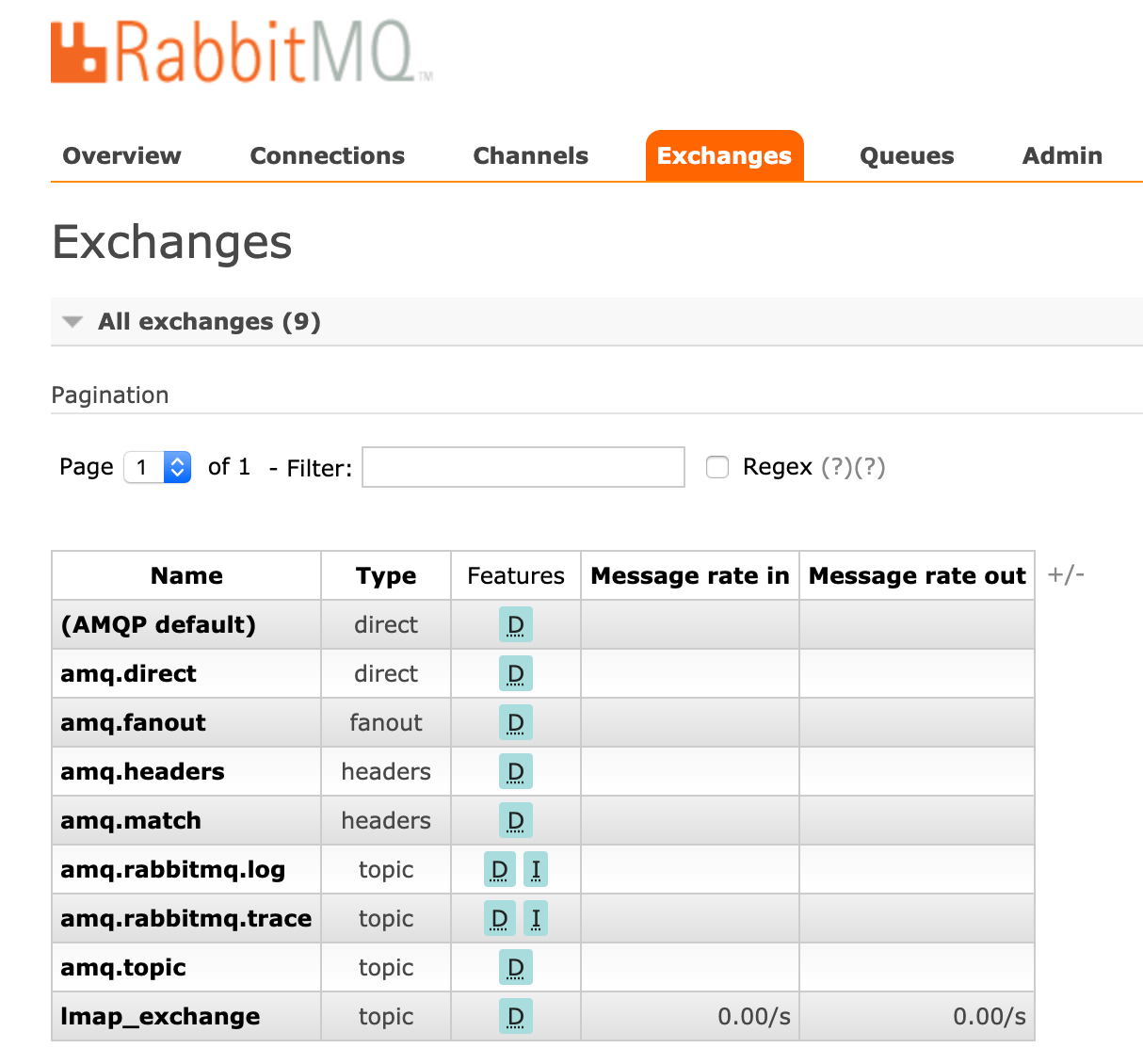
Here we can see that lmap_exchange is defined as a durable (D) exchange. If it isn't durable, it doesn't survive a reboot. *
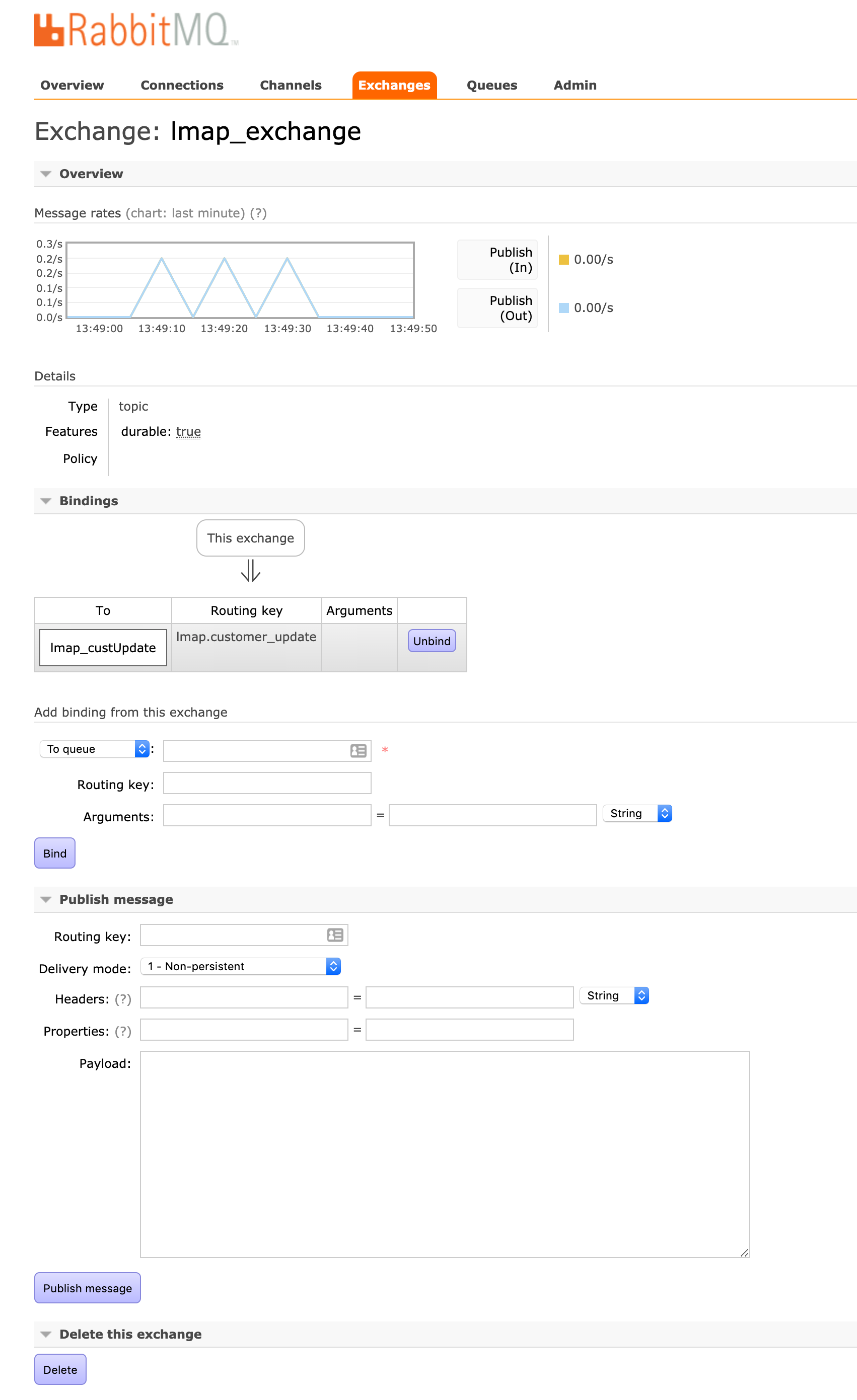
Here we can see the binding of the lmap_custUpdate Queue to the lmap.customer_update routing key. *
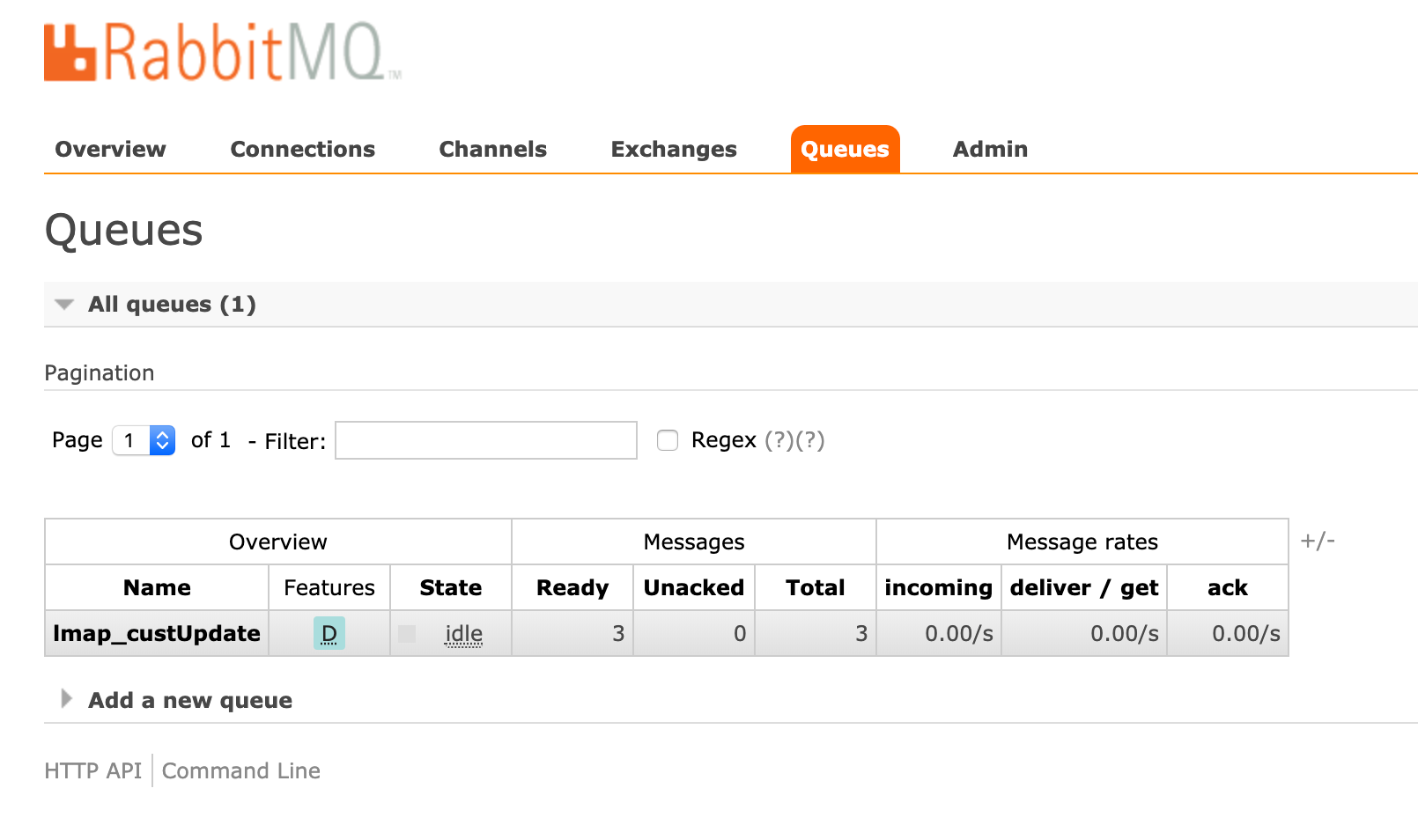
Here we see the lmap_custUpdate queue - note that it is durable, if this isn't set then it doesn't survive a server restart. Also note that this one has three messages in the queue (awaiting a consumer to start up). *
- Posting messages to the topic yielded the expected output on the consumer.
Shutting down the consumer I could see that the queue wasn't removed (as it's durable). If it wasn't marked as durable the queue gets deleted and no messages will get routed, the consumer will start up as normal, but it won't process any of the backlog.
Sending more messages from the producer started filling the queue.
Starting the consumer up processed all of the backed up messages in the queue (which is what I wanted).
Shutting the consumer down, sending messages into the queue and restarting the rabbitmq server and then starting the consumer process processed all of the messages that were sent in to the queue (note that if you do not explicitly mark the messages as persistent, THIS WILL DROP MESSSAGES).
Conclusion
In conclusion, RabbitMQ topics are a great way of routing messages to subscribers based on a routing key. You will need to set a few important options to make sure you don't accidentally lose exchanges, queues and messages (namely setting exchanges and queues to durable, and making sure the messages are marked as persistent).
Todo
- Look into configuring durable exchanges and queues in rabbitmq config (as opposed to dynamically generating them from client code (should be pretty simple).
- Implement some security around writing and reading from queues
- Add some error checking in suitecrm in case the AMQP server is not running.