
GIS servers can pre-generate tiles to vastly improve WMS performance. Geoserver provides a handy web interface for interacting with the geoserver web cache (GWC), but sometimes it is handy to script this process (particularly when you are working with hundreds of layers). Geoserver 2.1 provides a REST API that allows you to trigger tile preseed jobs. Here are a couple of python scripts that I wrote that use this API to perform a purge and seed operation. Change the following config file to include your desired geoserver layers and zoom levels (I assume that you want 900913 png tiles, and two threads per layer - the scripts can easily be modified to change this however). Listing 1 seed_config.py:
#This config file contains options for the gwc preseeding scripts
geoserver_userpass = "admin:XXXXX"
geoserver_url = "http://GEOSERVER_URL"

#Zoom levels to create tiles for
zoom_start = "0"
zoom_stop = "10"

#Geoserver layers to perform preseeding operation on

layers = ["ALA:Rees_CAAB37009001Polygon","ALA:Rees_CAAB37007002Polygon","ALA:Rees_CAAB37007001Polygon","ALA:Rees_CAAB37006001Polygon","ALA:Rees_CAAB37010004Polygon","ALA:Rees_CAAB37005005Polygon","ALA:Rees_CAAB37008003Polygon","ALA:Rees_CAAB37005002Polygon","ALA:Rees_CAAB37011001Polygon","ALA:Rees_CAAB37008001Polygon","ALA:Rees_CAAB37005004Polygon","ALA:Rees_CAAB37005001Polygon","ALA:Rees_CAAB37012002Polygon","ALA:Rees_CAAB37007003Polygon","ALA:Rees_CAAB37010002Polygon","ALA:Rees_CAAB37010003Polygon"]
Listing 2 purge.py:
#!/usr/bin/python

#This script removes tiles from the GWC cache
#Ensure that seed_config.py has been configured before use

import os
import seed_config

for layer in seed_config.layers:
 curlstring="curl -u " + seed_config.geoserver_userpass + " -XPOST -H 'Content-type: text/xml' -d '" + layer + "900913" + seed_config.zoom_start + "" + seed_config.zoom_stop + "image/pngtruncate2' " + seed_config.geoserver_url + "/geoserver/gwc/rest/seed/" + layer + ".xml"
 os.system(curlstring)
 print "truncated " + layer
Listing 3 seed.py:
#!/usr/bin/python

#This script is used to preseed gwc layers
#Ensure that seed_config.py has been configured before use

import os
import seed_config

for layer in seed_config.layers:
 curlstring="curl -u " + seed_config.geoserver_userpass + " -XPOST -H 'Content-type: text/xml' -d '" + layer + "900913" + seed_config.zoom_start+ "" + seed_config.zoom_stop + "image/pngseed2' " + seed_config.geoserver_url + "/geoserver/gwc/rest/seed/" + layer + ".xml"
 os.system(curlstring)
 print "seeded " + layer
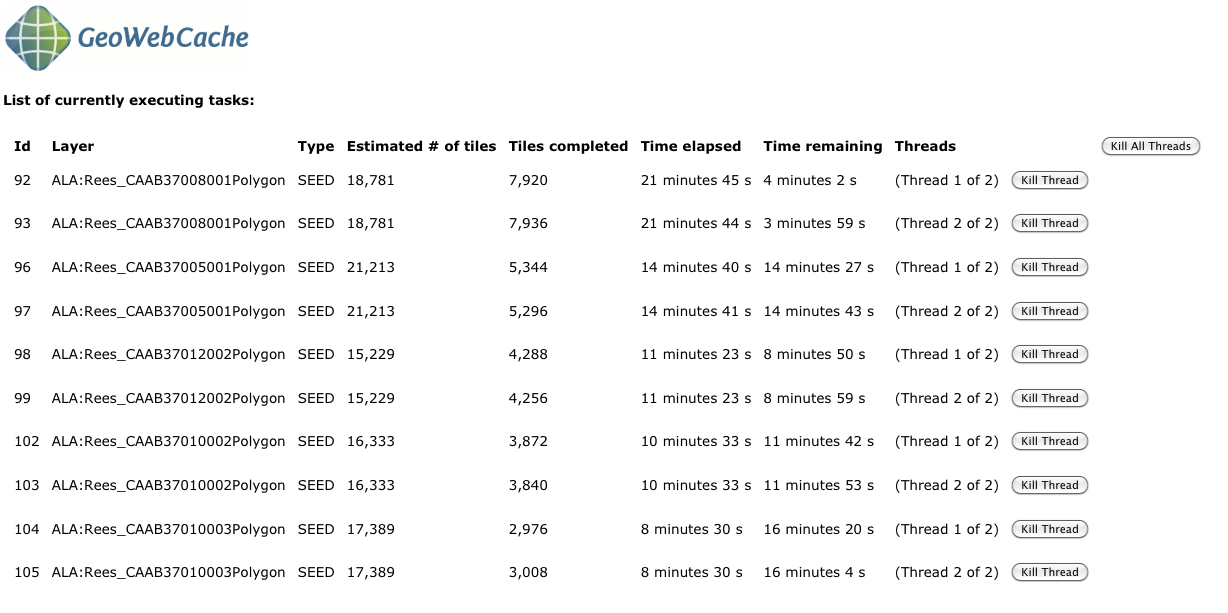
After you initiate the preseed jobs, you can jump back into the GWC tile creation page to get an idea of the status.
All generated tiles end up in your {geoserver_data_dir}/gwc/ folder. Update: The following solution for.net developers running an older version of Geoserver has been provided by Arnaud Buisson-Delandre below:
I finally managed to achieve some kind of preseed on 2.03 with a webservice in c#.

The tricks are : don’t use xml but plain html webrequest and encode the post data. Here are the “harsh” hard coded code ;) just in case….

[WebMethod]

        public void reseed_Postgis_tbv_p2000_cad2010()
        {

             ASCIIEncoding encoding = new ASCIIEncoding();

            string postData = "threadCount=12&type;=reseed&gridSetId;=EPSG%3A900913&format;=image%2Fpng&zoomStart;=00&zoomStop;=16&minX;=&minY;&maxX;=&maxY;=";

            byte[] data = encoding.GetBytes(postData);

            // Prepare web request...
            HttpWebRequest myRequest = (HttpWebRequest)WebRequest.Create("http://SERVER:8081/geoserver/gwc/rest/seed/Postgis:tbv_p2000_cad2010");

            myRequest.Method = "POST";

            myRequest.ContentType = "Content-Type=application/x-www-form-urlencoded";

            myRequest.Headers.Add("Authorization", "Basic " + Convert.ToBase64String(Encoding.ASCII.GetBytes("admin:PASSWORD")));

            myRequest.ContentLength = data.Length;

            Stream newStream = myRequest.GetRequestStream();

            // Send the data.

            newStream.Write(data, 0, data.Length);

            HttpWebResponse WebResp = (HttpWebResponse)myRequest.GetResponse();
            newStream.Close();
        }

I just had to put my asmx file on a IIS server and automatically call it from a blank asp.net page

After that I put some “explorer http://server/myasp.asp” on a task scheduler to execute daily

Cheers,

Arnaud