
A few months back I wrote about Pangolin's AI Gateway, which solved the remote-access side of our AI plumbing: identity-aware proxying in front of AI APIs for users coming in from outside. What it didn't solve was the internal problem. We have a four-node DGX Spark ring serving models through vLLM, a handful of commercial provider accounts, and developers who need access to some combination of all of it. The question was how to hand out keys without handing out the keys: the real vLLM endpoints and the real vendor credentials stay private, each developer gets their own key, and each key only opens the models that developer should be using.
The answer turned out to be LiteLLM, and specifically its Proxy Server. It is the missing glue I was looking for, and it has quietly become the piece of kit that ties the whole setup together.
What LiteLLM actually is
LiteLLM is best known as a Python SDK that translates one OpenAI-style call into the API dialect of whatever provider you are targeting. The Proxy Server is that same translation layer packaged as a FastAPI service: it presents a single OpenAI-compatible endpoint (/v1/chat/completions, /v1/responses, /v1/embeddings and friends) and fans requests out to over a hundred providers. The docs track around 190 provider integrations at the time of writing, the repo sits at 58.8k stars, and the project is shipping at a serious pace (v1.110.0 is current this week).
The important detail for us: anything that already speaks the OpenAI API works as a backend, and vLLM speaks the OpenAI API. So does just about everything else we touch, including the model endpoints our platform team publishes through GenAI on Tanzu Platform for Cloud Foundry. One proxy, one API shape, every model we own or rent behind it.
Getting going is genuinely easy
This is the part that surprised me. For a first look, it is three commands:
pip install 'litellm[proxy]'# config.yaml
model_list:
- model_name: qwen3.5-397b
litellm_params:
model: openai/qwen3.5-397b-int4-autoround
api_base: http://spark-01:8000/v1litellm --config config.yamlThat gives you a proxy on port 4000 serving the 397B model off the Spark cluster, callable with any OpenAI client pointed at http://localhost:4000. The openai/ prefix in the model string is LiteLLM's way of saying "this backend speaks the OpenAI protocol, here is where it lives." Native vLLM support exists too, but the OpenAI-compatible path is what I use everywhere because it keeps every backend uniform.
For a real deployment you want the published Docker setup instead: the ghcr.io/berriai/litellm image plus Postgres in a compose file, with DATABASE_URL set. Postgres is not optional decoration. Virtual keys, budgets, spend logs, teams and the Admin UI all live there, and the proxy runs its own Prisma migrations at startup. Skip the database and /key/generate will simply tell you there is no connected DB. The project provides a one-line bootstrap script and a ready-made compose file; the whole thing from docker compose up to a working Admin UI is under ten minutes.
Issuing keys instead of sharing them
This is the core of the exercise. With the proxy up and LITELLM_MASTER_KEY set, creating a developer key is one API call:
curl -X POST http://localhost:4000/key/generate \
  -H "Authorization: Bearer $LITELLM_MASTER_KEY" \
  -H "Content-Type: application/json" \
  -d '{
    "models": ["qwen3.5-397b", "glm-flash"],
    "max_budget": 50,
    "budget_duration": "30d",
    "rpm_limit": 120,
    "duration": "90d",
    "metadata": {"developer": "james", "project": "caravan-monitor"}
  }'
That key can call exactly two models, has a USD 50 budget that resets every 30 days, is capped at 120 requests per minute, and expires in 90 days. Spend is tracked per request in the LiteLLM_SpendLogs table using LiteLLM's model cost map, and for local models the map entries are effectively zero, so a developer can hammer the Spark cluster all month without touching the budget while every commercial call is metered. /key/info shows you what any key has spent, and /key/update, /key/block and /key/delete cover the rest of the lifecycle.
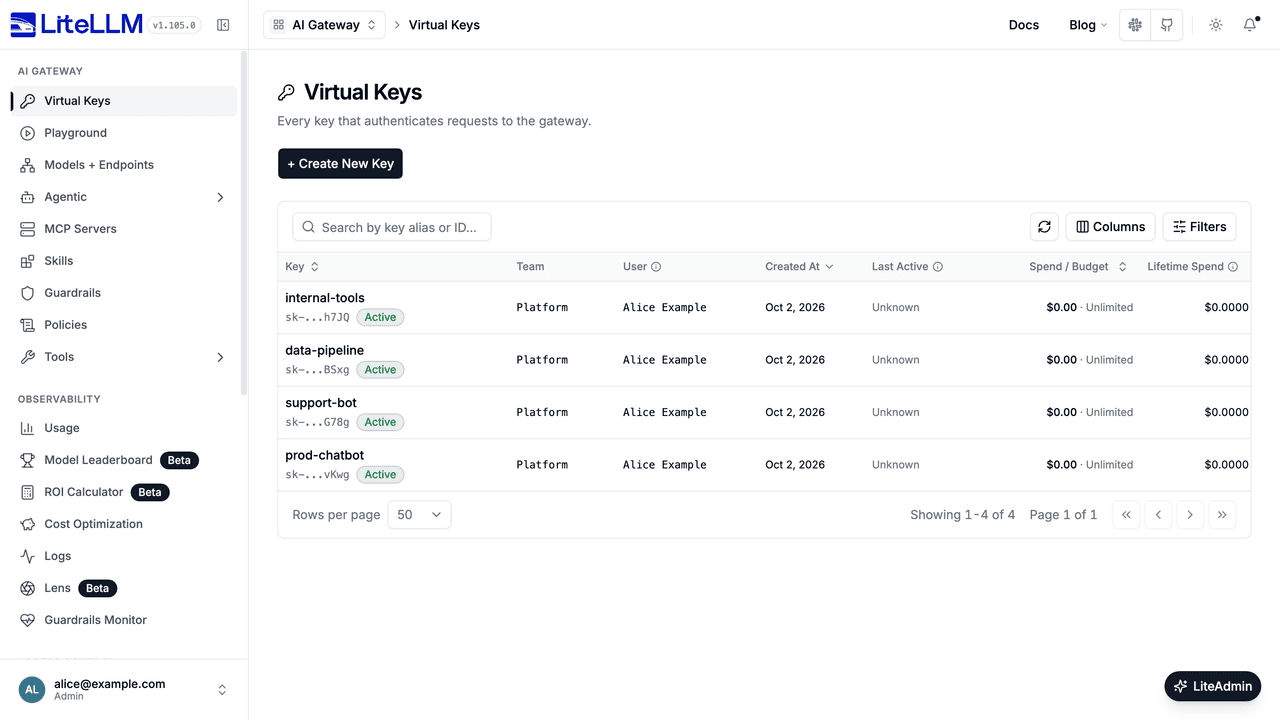
Everything above also has a point-and-click equivalent: the Admin UI's Virtual Keys page lists every key with its team, owner, spend and budget, and the same creation form is behind the + Create New Key button. Handy for one-off keys; the API is what you script.
For groups of developers there are teams (/team/new with its own models, budget and rate limits, members added by user ID) and, my favourite access-control feature, model access groups. Tag models in the config:
model_list:
  - model_name: qwen3.5-397b
    litellm_params:
      model: openai/qwen3.5-397b-int4-autoround
      api_base: http://spark-01:8000/v1
    model_info:
      access_groups: ["local-models"]
  - model_name: gpt-5
    litellm_params:
      model: openai/gpt-5.2
      api_key: os.environ/OPENAI_API_KEY
    model_info:
      access_groups: ["commercial"]
Then a key created with "models": ["local-models"] inherits every model in that group, present and future, without touching the key again. The practical split for us is exactly the one above: local-models for the Sparks, which everyone gets, and commercial for anything that bills us, which is granted case by case. One caveat: wildcard access groups (a group that matches every model) are an Enterprise feature. Named groups are free.
One front door, local and commercial
With that, the unified endpoint falls out naturally. A trimmed version of the shape we run:
model_list:
  # The ring - one vLLM endpoint presenting the big model
  - model_name: qwen3.5-397b
    litellm_params:
      model: openai/qwen3.5-397b-int4-autoround
      api_base: http://spark-01:8000/v1
      rpm: 60
  # A second deployment of the same model_name = load balancing group
  - model_name: qwen3.5-397b
    litellm_params:
      model: openai/qwen3.5-397b-int4-autoround
      api_base: http://spark-02:8001/v1
      rpm: 60
  # Small fast model on a single Spark
  - model_name: glm-flash
    litellm_params:
      model: openai/GLM-5.3-Flash-FP4-Local
      api_base: http://spark-03:8000/v1
  # Commercial
  - model_name: gpt-5
    litellm_params:
      model: openai/gpt-5.2
      api_key: os.environ/OPENAI_API_KEY
  # Models our platform team brokers through Cloud Foundry
  - model_name: cf-llama
    litellm_params:
      model: openai/llama-4-maverick
      api_base: https://genai.apps.example.com/v1
      api_key: os.environ/CF_GENAI_KEY

router_settings:
  routing_strategy: simple-shuffle
  num_retries: 2
  timeout: 600
  allowed_fails: 2
  cooldown_time: 60
  fallbacks: [{"glm-flash": ["gpt-5"]}]
Two deployments under one model_name form a load-balancing group; LiteLLM spreads requests across them honouring the per-deployment rpm hints (the default simple-shuffle strategy, with least-busy, latency-based, usage-based and cost-based strategies available, plus cache-aware routing if you want prompts to stick to the node that already has the context warm). fallbacks means a developer calling the local flash model gets quietly redirected to a commercial model if the Spark is down or saturated. There is also model_group_alias, which lets you publish a stable public name and swap the underlying deployment underneath it, so developer code never has to change when the cluster does.
The result: developers get one base URL and one key. Local models, commercial vendors and the Cloud Foundry-brokered models all sit behind it, and which of those any given key can see is a line in a config file or a field in a key-creation call.
Guardrails and policies
LiteLLM has a proper guardrail framework rather than a checkbox. Guardrails attach to the proxy with modes (pre_call, during_call, post_call) and can be switched on globally with default_on: true. The open-source build gives you two things: custom guardrails, where you point the proxy at your own code that inspects and can block or mutate any request, and Presidio-based PII detection and masking. A minimal Presidio setup looks like:
guardrails:
  - guardrail_name: pii-mask
    litellm_params:
      guardrail: presidio
      mode: pre_call
      default_on: true
That scrubs personally identifiable information out of prompts before they leave the proxy, which matters the moment prompts can be routed to a commercial fallback. The named third-party integrations - LLM Guard, Llama Guard, OpenAI Moderations, Lakera, Aporia, hidden-secret detection and so on - are Enterprise-licensed, as is attaching guardrails per key or per team rather than globally. Worth knowing when you are scoping which tier you need.
MCP: the same key that gates models gates tools
The feature I had not expected to care about, and now consider essential, is the MCP gateway. MCP servers (the tool providers for agentic workflows) register in the same config file over HTTP, SSE or stdio, and the proxy exposes them all on a single /mcp/ endpoint:
mcp_servers:
  grafana:
    url: https://grafana.internal.example.com/mcp
    auth_type: api_key
    auth_value: os.environ/GRAFANA_MCP_KEY
A developer's agent connects to https://litellm.internal/mcp/ with two headers: x-litellm-api-key for their normal virtual key, and x-mcp-servers to select which servers they want. The access-control angle is the point: keys and teams carry mcp_servers and mcp_access_groups restrictions, so the same key that decides which models James can call also decides which tools his agent can touch. There is full REST CRUD for MCP servers if you want to manage them without editing config, and a require_key_mcp_access_defined setting for the paranoid that denies MCP access to any key without an explicit grant. One control plane for models and tools is a much better story than two.
Watching it
The Admin UI (browse to /ui, log in with the master key) covers keys, users, teams, models, budgets and spend charts, and for day-to-day operation it is genuinely decent: creating a key or checking who spent what is a thirty-second job. Prometheus metrics come off /metrics for Grafana, and for LLM-specific observability the proxy ships native integrations with Langfuse (the langfuse_otel preset is the recommended one), LangSmith and plain OpenTelemetry, so full request traces land wherever your tracing already lives.
What the Enterprise licence adds, and what it costs
The open-source build is MIT-licensed and, usefully, the Enterprise features ship in the same container image: set a LITELLM_LICENSE environment variable to your licence key and the gated features unlock in place. The enterprise/ folder of the repo is under BerriAI's separate enterprise licence, which is at least honest about where the line is.
The headline gated features:
- SSO/OIDC/SAML for the Admin UI beyond five users (five is the free allowance), plus SCIM provisioning, audit logs and JWT auth
- Secret manager integrations - HashiCorp Vault, AWS/Azure/GCP secret stores - so provider credentials never sit in config files or environment variables
- The named guardrail integrations (LLM Guard, Lakera, Aporia and friends), and per-key/per-team guardrails
- Wildcard model access groups, spend reports, tag-based budgets, per-model budgets and temporary budget increases
- Team-based logging controls (useful for GDPR-style data handling), GCS/Azure log export
- A multi-region control plane for running proxies across regions, FIPS-compliant builds, and the support SLA itself
Pricing is not published, and this is where researching the costs runs into a wall that turns out to be deliberate. LiteLLM Enterprise is sold as an annual subscription, sized by the request capacity you need through the gateway, with deployment architecture and support level factored in. BerriAI is explicit that they never charge per token - their argument being that a per-token model punishes you for succeeding. There is also no longer a hosted LiteLLM Cloud tier; the hosted beta was quietly dropped and the pricing page now lists only the self-hosted options. You talk to sales, you get a quote, there is a 30-day free trial licence, and it is procurable direct or through the AWS and Azure marketplaces. Air-gapped deployments are available.
For actual numbers you have to go to third-party deal data. Vendr's benchmarks, drawn from a small handful of real purchases, put the median Enterprise deal at around USD 27k per year, with a typical range of USD 14k to 49k depending on capacity and support level. Treat those as ballparks rather than list prices, but they set the scale of the conversation: this is enterprise-software money, not pocket-money SaaS.
Breakout: Is it worth paying?
For our scale - one cluster, a single-digit number of developers, no compliance mandate - the MIT build covers every requirement on the list. Virtual keys, budgets, access groups, routing, Presidio guardrails, MCP gating, Prometheus and the Admin UI are all free. Enterprise becomes compelling at a specific inflection point: the day SSO/SCIM, audit logging or a proper secrets backend stop being nice-to-haves and become audit findings, or the day the gateway is critical enough that you want a vendor on the phone. That day will come for the work environment before it comes for the home office, and the pricing model means the conversation will be about capacity and support, not about metering our own usage - though the deal benchmarks above say that conversation starts in the tens of thousands a year.
The alternatives
LiteLLM is not the only option. I looked at the field and cut it to the five that are genuinely the same kind of thing: self-hostable, OpenAI-compatible gateways with virtual keys, budgets and model routing you could actually put in front of vLLM. Hosted-only services like Cloudflare AI Gateway and OpenRouter solve a different problem, and Kong's AI plugins only make sense if you already run Kong.
- Portkey AI Gateway - open-core, MIT-licensed gateway with virtual keys, budgets and RBAC, self-hostable or SaaS. The closest like-for-like competitor, with a polished hosted control plane around it: the cloud tier starts free (10k logs/month), Production is $49/month, and SSO/SCIM plus audit logs sit in the custom Enterprise tier.
- Bifrost - Apache-2.0, written in Go by Maxim, with virtual keys, budgets and rate limits in the open-source tier (the closest feature match to LiteLLM I found) and an aggressive performance pitch: they claim microseconds of overhead and roughly 9x LiteLLM's throughput. Enterprise adds HA clustering, SSO, guardrails and an MCP gateway, with pricing behind a demo form. The most interesting newer entrant.
- Helicone ai-gateway - Rust, observability-first, with a claimed sub-millisecond overhead. Strong if analytics is your primary concern. Their cloud runs Hobby (free, 10k requests/month), Pro ($79/month) and Team ($799/month) tiers; the gateway itself is self-hostable, though note the licence is actually GPL-3.0 despite a stale Apache badge in the README, which matters if you plan to modify and embed it.
- TensorZero - Apache-2.0 Rust LLMOps platform whose gateway claims sub-millisecond p99 latency at 10k+ QPS, with observability and experimentation built in. It is more than a gateway and less focused on per-key access control; if you want the optimisation and evaluation tooling too, it is worth a serious look.
- new-api - a fork of one-api with channel management and a polished dashboard, popular in the Chinese self-hosting community and very actively maintained. Functional and free, with one caveat: it is AGPL-3.0 with additional attribution terms, which deserves a careful read before you build anything commercial on it.
Two honourable mentions that failed the same-kind-of-thing test: RouteLLM, the LMSYS research project on cost-quality routing - intellectually influential, effectively unmaintained since August 2024, read it for the ideas - and Envoy's AI gateway work, donated to the Linux Foundation's Agentic AI Foundation in September 2026 and the natural path only if you already run Envoy at scale.
The pattern in this list is that most alternatives lead with either performance (Bifrost, Helicone, TensorZero) or a hosted control plane (Portkey), and only Portkey and Bifrost match LiteLLM on virtual keys and budgets as first-class features. LiteLLM's edge is the combination: the widest provider coverage, keys with budgets and access groups in the MIT tier, MCP gating, and a project velocity the others are not matching. The weakness is the same Python/FastAPI core that makes it approachable - if you are pushing serious request volumes, benchmark it against the Go and Rust options before committing.
Where this leaves us
The internal gap is closed. Developers get their own keys, keys get model allow-lists and budgets, the Spark cluster is free to use and the commercial models are metered, and the same credentials gate MCP tools as well as models. Pangolin still handles the outside world; LiteLLM owns the inside one. The two complement each other neatly, and if anything the Pangolin post undersold how much of the endgame LiteLLM already implements.
Next on the list is standing this up permanently in front of the ring with proper DNS and TLS, wiring the Admin UI behind SSO if the user count ever justifies the Enterprise conversation, and pointing Bob at the proxied endpoint for a week to see what the spend reports say about how I actually use models.
Related:
- 🔑 LiteLLM Proxy Server docs - quickstart, virtual keys and config reference
- 💰 LiteLLM pricing - the Enterprise model, capacity-based and never per-token
- 🔐 There's No Kimi Button: Custom Providers on Pangolin's New AI Gateway - the remote-access half of the story
- ⚡ Clustering Four DGX Sparks in a 200Gb/s Ring - the cluster behind the
local-modelsgroup - 🦙 From Ollama to vLLM - how the models got onto the Sparks in the first place