
Illustration inspired by the cover of FreeBSD Mastery: Advanced ZFS.
ZFS has been on my list of things to understand properly for a long time. Coming from conventional enterprise storage, I am used to thinking in arrays, LUNs, datastores and replication jobs. ZFS puts much of that machinery within reach of the operating system and the people administering it.
That makes it vastly different from a conventional Linux filesystem such as ext4 or XFS. Those filesystems normally sit on top of storage assembled elsewhere. ZFS reaches down into the storage layout itself, combining pools, redundancy and volume management with checksums, copy-on-write snapshots, compression, replication and recovery tooling.
It is unquestionably enterprise-grade. Many of these are capabilities I would once have expected to buy as part of an expensive commercial storage platform. With ZFS, we would probably own that stack ourselves: disk layout, hardware selection, monitoring, capacity planning and recovery. That control is appealing, but the ownership is part of the cost.
I am still learning it. What interests me is how those capabilities fit into ordinary infrastructure work: hosting virtual machines, storing backups, serving files and moving large collections of data between systems.
From Solaris to OpenZFS
ZFS began at Sun Microsystems in 2001, and its source was released through OpenSolaris in 2005. It shipped in the June 2006 update to Solaris 10. The project history and Solaris release notes trace those early milestones.
In September 2013, OpenZFS launched to bring together the open-source development work across platforms including Linux, FreeBSD and illumos. OpenZFS is the implementation discussed here; Oracle's Solaris ZFS continued along a separate development path.
I first took notice of OpenZFS when we were running FreeBSD on production servers. At the time, ZFS felt like one of FreeBSD's big-ticket advantages over Linux. I even bought FreeBSD Mastery: Advanced ZFS by Allan Jude and Michael W. Lucas. I remember thinking the concepts were seriously next-level, but never really got the opportunity to explore them in depth.
Its commercial use now spans storage appliances, cloud services and integrated infrastructure. TrueNAS Enterprise builds supported storage appliances around OpenZFS. Amazon FSx for OpenZFS offers it as a managed NFS file service. Oxide uses it beneath a distributed storage service with its own replication and failover design.
Pools, vdevs, datasets and zvols
A conventional storage stack might have a RAID controller or array protecting disks, a volume manager allocating space, and a filesystem managing files. ZFS combines those responsibilities and manages the redundancy itself.
| Term | Role |
|---|---|
| Pool | Shared storage capacity assembled from one or more vdevs. |
| Vdev | A disk or group of disks, such as a mirror or RAIDZ group. Redundancy is defined here. |
| Filesystem dataset | A filesystem within the pool, with its own mount point, quotas, compression and snapshots. |
| Zvol | A dataset exposed as a block device, suitable for a VM disk with a guest filesystem inside it. |
A dataset gives a workload its own policies without assigning it dedicated physical disks. The pool concepts and dataset concepts manuals cover the structure.
Where LVM fits
LVM sits between physical storage and a filesystem in a conventional Linux stack. It groups physical volumes into a volume group, then allocates logical volumes that can be formatted with ext4, XFS or another filesystem. LVM manages blocks; the filesystem above it manages files.
| Conventional Linux stack | ZFS stack |
|---|---|
| Disks or RAID → LVM physical volumes → volume group → logical volumes → ext4/XFS | Disks → ZFS vdevs and pool → filesystem datasets or zvols |
At the host level, LVM and ZFS are usually alternative storage stacks rather than layers to place on top of each other. ZFS takes over the volume-allocation role while also providing the filesystem, redundancy, checksums and snapshots. I would normally give ZFS direct access to its disks instead of putting it on an LVM logical volume, which would hide the underlying device layout behind another layer.
They can still complement each other. A guest stored on a ZFS zvol can use LVM inside its virtual disk, and a host can use ZFS and LVM on separate storage. In Proxmox, LVM-thin and ZFS are separate local-storage backends. LVM-thin supports efficient VM snapshots and clones, while ZFS provides the broader integrity and filesystem model described here.
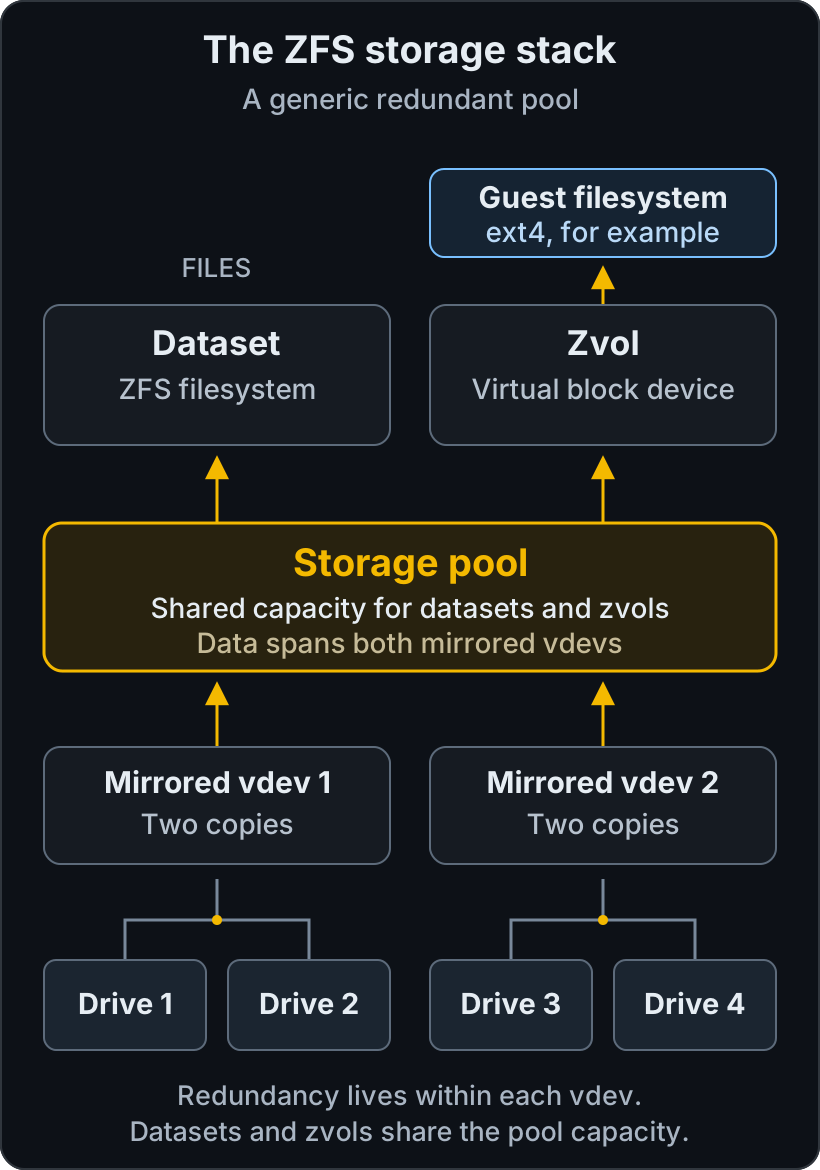
Two mirrored vdevs contribute capacity to one pool. Filesystem datasets and virtual disks share that capacity.
The pool distributes data across its normal top-level data vdevs. Losing an entire required vdev can lose the pool. In the diagram, either disk in a mirror can fail, but losing both members of the same mirror is fatal to that vdev. Adding an unprotected disk as another data vdev would introduce a single-disk failure point for the whole pool.
ZFS uses copy-on-write: changed blocks are written to new locations before references are updated. A snapshot preserves an earlier state without copying the whole dataset. As live data changes, the snapshot retains blocks that would otherwise be freed.
Checksums detect damaged blocks. Repair requires a healthy additional copy or enough redundant data to reconstruct the original. A scrub can find damage on a single-disk pool, but cannot recover data for which no good copy remains. See the scrub manual.
What ZFS adds to Proxmox
Proxmox VE's local ZFS backend supports VM disks and container filesystems, with integrated snapshots, clones, compression and optional thin provisioning. Templates and clones can share unchanged blocks, while ZFS properties can be inherited from a parent dataset. Thin provisioning still needs capacity monitoring.
Its storage replication framework uses snapshots to copy guest volumes to another node, then sends only changes. This can reduce migration traffic and support HA recovery using local disks instead of shared storage. Replication runs on a schedule, so a failure can lose changes since the last successful sync; quorum and HA configuration remain separate responsibilities.
Guests keep their own filesystems: ext4 or NTFS inside a ZFS-backed virtual disk is perfectly ordinary. Manage Proxmox-owned disks through Proxmox, and use the ZFS tools to inspect the underlying storage.
Choosing a layout and hardware
Mirrors generally suit small random I/O, including many VM workloads. RAIDZ trades some of that flexibility for capacity efficiency, especially with larger sequential workloads. RAIDZ1, RAIDZ2 and RAIDZ3 tolerate one, two and three failed disks respectively within a vdev. Performance still depends on the media, number of vdevs and workload; the OpenZFS tuning guide is a useful starting point.
With equal-sized drives, a two-way mirror provides roughly half its raw capacity before overheads. An N-disk RAIDZ2 group starts with roughly N minus two drives' worth. Leave room for metadata, snapshots, growth and recovery work before promising capacity to applications.
Expansion options include:
- Adding another redundant data vdev to the pool.
- Replacing members with larger drives. The additional capacity requires all members of the vdev to be expanded, as described in the online manual.
- Widening a RAIDZ vdev on supported versions. OpenZFS 2.3 introduced RAIDZ expansion. It retains the existing parity level, and old blocks retain their previous data-to-parity ratio. The attach manual documents the process. Proxmox supports it from VE 9 with ZFS 2.3.3.
Attaching another disk to a mirror adds redundancy rather than usable capacity. Plan expansion before buying the disks; the installed software version and pool features constrain the available options.
For hardware, give ZFS direct disk access through suitable controllers or HBAs. Proxmox's ZFS guidance recommends ECC RAM and advises against putting ZFS over a caching hardware RAID controller. Reliable flush behaviour, SSD endurance, power-loss protection and replacement availability belong in the specification too.
Avoid buying the wrong kind of cache
| Mechanism | Purpose |
|---|---|
| ARC | RAM cache. Budget it alongside applications and VMs. |
| L2ARC | Additional read cache on another device; also consumes RAM for bookkeeping. |
| SLOG | A separate intent-log device for synchronous writes. It can improve their latency, but is not a general write cache. |
| Special vdev | Holds actual metadata and optionally small data blocks. Its loss can lose the pool, so it needs appropriate redundancy. |
The OpenZFS cache guide covers the tradeoffs. Measure the bottleneck before adding hardware. A read-cache SSD cannot fix a workload limited by synchronous writes.
Filesystem recordsize, zvol volblocksize and physical-sector alignment (ashift) also affect performance. Larger backing blocks can amplify small guest writes. Test representative sustained I/O, including while the pool is degraded or rebuilding.
Keep operating headroom: OpenZFS recommends more than 10% free. Set alerts early enough to allow procurement and expansion. Snapshot retention and thin provisioning can consume the margin quickly.
Compression can reduce space and I/O where data compresses well. Deduplication needs its own memory and workload sizing; I would leave it off initially. The property reference covers both.
Day-to-day operation and recovery
zpool manages pools and devices; zfs manages datasets, volumes and snapshots. The cheat sheet below covers everyday administration.
Schedule scrubs to read allocated data and verify checksums. They generate I/O and repair only what redundancy permits. A resilver reconstructs missing or outdated data after attachment or replacement; ZFS does not run a scrub and resilver together. The scrub documentation explains the difference.
Record disk identities and enclosure slots before a failure. When replacing a device, follow the resilver through to completion. Boot-pool replacements also need the platform's bootloader procedure.
For recovery, a filesystem snapshot can be browsed through .zfs/snapshot/<name>. Copy out a deleted file, or create a writable clone to inspect an earlier state. Rollback discards later changes, so establish what needs recovering before using it.
Snapshots are atomic at the storage layer. Databases and guests may still need flushing, quiescing or application-native backups to produce a usable recovery point. Keep retention within the capacity budget: deleting a live file does not free blocks still referenced by snapshots. Test recovery onto another pool or machine as well as local restores.
Check recovery-host compatibility before enabling new pool features. A zpool upgrade can make the pool unreadable by older software.
What happens when ZFS goes bad
ZFS is good at describing unhealthy storage, but somebody still has to collect those signals and act on them. A pool can remain available in a DEGRADED state after losing redundancy. If another valid copy exists, ZFS can repair a damaged block; without one, zpool status -v reports a permanent data error. Losing a required top-level vdev can make the whole pool unavailable.
I would treat a degraded pool as urgent even while applications are still running. The replacement and resilver period is exactly when the remaining disks are carrying more risk.
Native health and event reporting
| Signal | What it shows |
|---|---|
zpool status -vP |
Pool and vdev state, full device paths, read/write/checksum counters, scrub or resilver progress, and known permanent data errors. |
zpool status -x |
Only pools with errors or that are unavailable; convenient input for a monitoring check. |
zpool events -v |
Recent kernel events including checksum and I/O errors, slow or hung I/O, missing devices, spare activation, scrubs and resilvers. |
zpool history -il tank |
Administrative commands and internal pool history useful during an investigation. |
| SMART/NVMe and kernel logs | Media errors, wear, temperature, link resets and controller faults below the ZFS layer. |
The zpool events history comes from the kernel's recent-event queue; it is not a durable log archive. On Linux, the ZFS Event Daemon listens for those events and runs enabled zedlets. Distribution packages commonly provide zedlets for logging or notification, but the exact files and service names vary. Check that ZED is running, inspect its journal or syslog output, and forward those records off the storage host.
Useful first checks on a systemd-based host are:
zpool status -vP
zpool status -x
zpool events -v
zpool history -il tank
systemctl status zfs-zed.service
journalctl -u zfs-zed.service
Do not clear error counters merely to make a dashboard green. Capture the status and event evidence first, identify the device or path involved, and confirm that the repair or replacement completed. zpool clear clears recorded errors; it does not repair failing hardware.
Alerts I would expect
| Condition | Monitoring response |
|---|---|
Pool or required vdev is not ONLINE |
Alert immediately, with the pool, device path or GUID and current state. DEGRADED still means redundancy has been reduced. |
| Read, write or checksum counters increase | Open an investigation even if the pool remains online; correlate with ZFS events, SMART/NVMe data and kernel logs. |
| Permanent data errors appear | Critical alert with the affected objects from zpool status -v, followed by application-level validation or restore. |
| Free capacity crosses operating thresholds | Warn early enough to expire snapshots, move data or add capacity without entering the last 10% under pressure. Track the trend as well as the current percentage. |
| Scrub is overdue, aborts or completes with errors | Alert on the schedule and result, not merely whether a scrub happens to be running when the poll occurs. |
| Resilver or spare activation starts | Notify the operations team, then alert if progress stalls or the final pool state is not healthy. |
| ZED or the monitoring agent stops reporting | Treat stale monitoring as its own fault; silence is not an ONLINE pool. |
| Replication or backup stops advancing | Alert on the age of the last successful snapshot, send and receive, then keep testing restores separately. |
Pool health is only one layer. Monitor the physical devices, HBA or controller, enclosure, filesystem capacity, snapshot growth and application behaviour as separate services. zpool iostat can expose a busy or slow pool, but latency and throughput need workload-specific thresholds rather than a universal healthy value.
Checkmk
Checkmk has official checks for ZFS filesystem usage, pool size and pool status. The filesystem-usage check lists Linux, Solaris and FreeBSD agents. At the time of writing, the catalogue marks the pool-size and pool-status checks as Solaris agent checks; the status check reads zpool status -x, reports pool errors as critical, and warns on extended checksum or other error information.
For Linux and Proxmox hosts, verify what the installed Checkmk agent and version actually emit before relying on service discovery. If the packaged agent does not provide the health section, a Checkmk local check or maintained extension can wrap zpool status -x and expose one service per pool. Community extensions such as the OPOSS zpool iostat plug-in add capacity, throughput, latency and maintenance metrics, but their compatibility and support remain with the extension maintainer.
I would pair the ZFS checks with Checkmk services for ZED, SMART/NVMe health, capacity, scrub age and replication freshness. Then force a test state in a lab or test fixture and confirm that discovery, state changes, notification routing and recovery messages all work.
Nagios
Nagios Core deliberately delegates service checks to external plugins. It has no built-in understanding of ZFS, but a plugin can run locally through NCPA or NRPE, or remotely through check_by_ssh, and return the usual OK, WARNING, CRITICAL or UNKNOWN state.
Nagios Exchange has a community check_zfs plugin for pool health, but its listed release dates from 2009 and targets Solaris/OpenSolaris and early FreeBSD. I would treat it as an example rather than deploy it unchanged on a current Linux host.
A small maintained site plugin can inspect zpool status -x, or the JSON form of zpool status where the installed OpenZFS version supports it. It should report the affected pool and devices, map degraded state and new error counters to the site's chosen severity, and publish capacity or error counters as performance data. Run it on the storage host with only the permissions it needs. Whatever collects the result, test the complete path from an unhealthy sample through to the person expected to respond.
Updating repositories inside a restricted network
Another team I work with uses ZFS deltas to move software repository updates from an internet-connected system into a restricted network. I believe a data diode is involved, but have not confirmed that detail. One possible design follows.
Repository-specific tools could populate datasets containing Debian/Ubuntu mirrors, Git repositories, Python/PyPI mirrors or npm content served through something such as Verdaccio. Once an update is complete and coherent, ZFS takes a snapshot. An initial full send establishes the destination, followed by incremental streams through the approved transfer mechanism. The destination receives the data, validates the repository and makes the release available to clients.
ZFS tracks changed blocks between snapshots, avoiding a fresh walk of the file tree to discover changes. It handles replication; the repository tools still handle packages and metadata, and the gateway handles transport across the boundary.
Here is the basic sequence for one filesystem dataset. Assume existing pools source and restricted, a populated source/repos dataset, and staging directories /export and /import outside that dataset. Use suitable ZFS privileges and allow space for the stream files. For the initial receive, restricted/repos must not already exist.
# Source: after the repository update has completed
zfs snapshot source/repos@release-001
zfs send source/repos@release-001 > /export/repos-full.zfs
Check that the send completed, then transfer the finished file through the approved mechanism. At the destination:
zfs receive -u -o readonly=on restricted/repos < /import/repos-full.zfsFor the next completed update:
# Source
zfs snapshot source/repos@release-002
zfs send -i source/repos@release-001 source/repos@release-002 \
  > /export/repos-001-to-002.zfs

# Destination, after successful transfer
zfs receive -u restricted/repos < /import/repos-001-to-002.zfs
The -i send contains the changes between those endpoints. On the initial receive, -u suppresses automatic mounting; readonly=on prevents ordinary filesystem writes. Keep logs and local state elsewhere. For later imports, stop serving and unmount the receiving dataset first, or serve a separate validated snapshot or clone. Verify each import and its repository contents before making the release available to clients.
Retain a shared baseline. The receiver's most recent snapshot must match the incremental starting point, with no independent filesystem changes. If 001 to 002 is missed, a receiver still at 001 cannot apply 002 to 003: replay the missing transfer or generate 001 to 003 while that source baseline remains. Otherwise, arrange another full transfer. A sender-side bookmark can preserve an incremental starting point, but the receiver still needs its matching snapshot.
Record successful imports and check snapshot identities, not just filenames. Do not use receive -F as a routine fix for a mismatch: it can discard destination state. Delivery, retries and acknowledgements need to fit the approved one-way design; ordinary bidirectional SSH cannot run directly through a diode.
A diode controls direction, and ZFS checksums detect damaged streams. Package signatures, publisher verification and import approval remain separate controls, as reflected in ASD's gateway guidance. If a gateway connects the networks, “restricted network” is a more accurate description than “air gap”.
When I would choose something else
| Requirement | Alternative to consider |
|---|---|
| An established SAN with supported multipathing and vendor recovery procedures | Keep the array's supported host filesystem or volume stack unless ZFS fills a specific gap. |
| Storage availability across server failures | A supported HA appliance or distributed system such as Ceph. Local ZFS alone does not provide cluster failover. |
| A simple Linux service with adequate backups | ext4 or XFS may cover the requirements with fewer storage-specific procedures. |
| A conventional Linux host needing flexible block volumes beneath ext4 or XFS | LVM, or LVM-thin for local VM storage, keeps the familiar block-storage model. |
| Object APIs and lifecycle policies | An object-storage service; a ZFS filesystem does not supply these by itself. |
| A team needing one accountable support provider | A supported storage product, including ZFS appliances. Budget the operating model as well as the disks. |
When LVM makes more sense
I would lean towards LVM when the requirement is to carve flexible block volumes for ext4 or XFS, particularly where a hardware array or Linux software RAID already owns the redundancy. It fits conventional Linux installation and recovery procedures, and may be the simpler choice for a team already operating that stack confidently.
LVM-thin is also a sensible Proxmox backend for local VM disks when efficient snapshots, clones and thin provisioning are required without adopting the wider ZFS operating model. LVM does not add ZFS-style end-to-end checksums, scrubs or self-healing, so those responsibilities remain with the array or RAID layer, the filesystem, monitoring and backups.
Summary
ZFS feels like a next-generation filesystem, although that description almost sells it short. It combines the filesystem with volume management, redundancy, checksumming, snapshots, replication and several layers of caching. That breadth is what makes it attractive, but it also moves a large amount of storage engineering into the operating system and onto the team running it.
For a small systems administration team, installing ZFS is the easy part. The harder work is building enough shared knowledge to design vdevs well, understand capacity behaviour, recognise failure modes, replace devices safely and recover data under pressure. Some layout decisions are awkward or expensive to change later. Reskilling also competes with normal operational work, and an outage is a poor time for the second person on the team to learn how pools and resilvers behave.
I would want more than one person able to operate the environment, backed by standard hardware and layouts, monitoring, reviewed changes, concise runbooks and regular recovery exercises. Starting with a bounded workload such as a backup target or file service gives the team room to learn before placing more critical systems on it.
Commercial storage vendors still have an important place. A supported array or appliance hides much of the controller, firmware, disk-health, failover and upgrade complexity behind a tested product and a support contract. The customer gives up some control and often pays more, but gains a clearer operational boundary and somebody to call during a difficult recovery. Some of those products use ZFS themselves; the value is in the integration, validation and support surrounding it.
I can see ZFS fitting well in VM hosts, file services, backup targets and repository distribution. I would choose it where the team wants that control and has the time to build the operational capability around it. Where the team cannot sustain that investment, a supported storage product may be the more responsible engineering choice.
ZFS Cheat Sheet
Linux/OpenZFS examples for routine administration. These are independent examples, not a script: substitute your pool, dataset, snapshot and device names. Changes require root or delegated privileges; add
sudowhere appropriate. Use Proxmox or appliance management tools for storage they own.
tankis an existing pool,tank/dataa filesystem,@beforea snapshot and#beforea bookmark. New dataset names and mount points must be unused.Inspect health, space and activity
Task Command Installed version zfs versionPool capacity and health zpool listDevice health, errors and full paths zpool status -vP tankFilesystems and volumes below a pool zfs list -r tankSpace used by data, snapshots and children zfs list -o space -r tankAll properties and their source zfs get all tank/dataNFS/SMB sharing properties zfs get sharenfs,sharesmb tank/dataSnapshots, oldest first zfs list -t snapshot -r -s creation tank/dataPool and device I/O every five seconds zpool iostat -v -y tank 5Pool administration history zpool history tank
zpool listreports pool allocation;zfs listaccounts for dataset space.iostat -yskips the initial since-boot report. Press Ctrl+C to stop it. Configure network shares through your platform's supported NFS/SMB tools.Create, rename and mount
Task Command Create a filesystem at a chosen path zfs create -o mountpoint=/srv/data tank/dataCreate a 50 GiB block volume zfs create -V 50G tank/volumeRename a dataset within its pool zfs rename tank/data tank/archiveList mounted ZFS filesystems zfs mountMount a filesystem zfs mount tank/dataUnmount a filesystem zfs unmount tank/dataChange its mount point zfs set mountpoint=/srv/archive tank/data
createnormally mounts a new filesystem immediately. A zvol is a block device and reserves its size by default. Stop consumers before unmounting, renaming or changing mount points; a rename can also change an inherited mount point. Filesystems withmountpoint=legacyuse the operating system's mount tools.Compression, quotas and reservations
Task Command Enable LZ4 compression for new writes zfs set compression=lz4 tank/dataCheck compression and achieved ratio zfs get compression,compressratio tank/dataRemove a local compression override zfs inherit compression tank/dataCap dataset, snapshots and descendants zfs set quota=100G tank/dataCap the dataset alone zfs set refquota=80G tank/dataReserve capacity for dataset and descendants zfs set reservation=10G tank/dataReserve capacity for the dataset alone zfs set refreservation=10G tank/dataRemove a quota zfs set quota=none tank/dataRemove a reservation zfs set reservation=none tank/dataQuotas limit consumption; reservations set capacity aside.
refquotaexcludes snapshots and descendants.nonealso clearsrefquotaandrefreservationwhen used with those property names.inheritremoves a local override so an inheritable property follows its parent or default. See the property reference.Snapshots and recovery copies
Task Command Snapshot one dataset zfs snapshot tank/data@beforeSnapshot it and its descendants together zfs snapshot -r tank/data@beforeShow changed paths since a snapshot zfs diff -F tank/data@before tank/dataCreate a writable recovery clone zfs clone -o mountpoint=/srv/review tank/data@before tank/reviewReverse the clone's dependency on its origin zfs promote tank/reviewProtect a snapshot from deletion zfs hold keep tank/data@beforeList its hold tags zfs holds tank/data@beforeRelease that hold zfs release keep tank/data@beforeFor individual files, browse
/srv/data/.zfs/snapshot/before/and copy out what you need.difflists changed paths, not file-content differences. Coordinate application consistency before taking snapshots.A clone stays in the same pool and depends on its origin snapshot.
promotereverses that dependency and transfers snapshot accounting; it does not rename the datasets or switch application paths. Releasing the last hold can allow a snapshot already marked for deferred deletion to disappear.Keys for encrypted datasets
Here
tank/secureis an existing encryption root; these commands do not enable encryption on an unencrypted dataset.
Task Command Inspect encryption and key status zfs get encryption,keystatus tank/secureFind the encryption root and key source zfs get encryptionroot,keylocation tank/secureLoad its key zfs load-key tank/secureUnload its key zfs unload-key tank/secureLoading uses the configured
keylocation;promptasks interactively. It does not mount the filesystem, so usezfs mountseparately. Before unloading, unmount affected filesystems and close users of encrypted volumes. Key operations also affect datasets inheriting that root's key.Send, receive and bookmarks
These examples assume completed snapshots
@s1and@s2, existing staging directories and enough free space. Check that each send succeeds before transferring its file.# Full stream from the source zfs send tank/data@s1 > /export/data-full.zfs # Incremental stream from s1 to s2 zfs send -i tank/data@s1 tank/data@s2 \ > /export/data-s1-to-s2.zfs # At the destination, after transferring each completed file: # Initial receive creates backup/data in an existing backup pool zfs receive -u -o readonly=on backup/data < /import/data-full.zfs # Later incremental receive zfs receive -u backup/data < /import/data-s1-to-s2.zfs # Preserve a source-side incremental starting point zfs bookmark tank/data@s1 tank/data#s1 zfs list -t bookmark -r tank/dataThe initial destination dataset must be absent. An incremental
receiveneeds the matching baseline as its latest snapshot, without independent filesystem changes.-usuppresses automatic mounting; it does not unmount an already mounted destination. Stop consumers and unmount it before updating a served replica, or serve a separate validated copy.A bookmark can replace the sender's old snapshot as the
send -istarting point, usingtank/data#s1. It retains no recoverable files; the receiver still needs its matching snapshot. The shell needs permission to write the stream file, even whenzfs sendruns undersudo.Scrub, import and export
Task Command Start checking allocated data zpool scrub tankMonitor scrub or resilver progress zpool status tankStop a running scrub zpool scrub -s tankList pools available to import zpool import -d /dev/disk/by-idImport a pool zpool import -d /dev/disk/by-id tankUnmount and release a pool for transfer zpool export tankA scrub repairs only where healthy redundant data exists. Import a pool only when it is inactive on other hosts. Stop consumers before exporting; export leaves the data intact.
Create pools and manage disks
Commands in this section change pool topology or initialise disks. Replace every uppercase device placeholder with a verified path from
zpool status -Por your disk inventory. New disks must contain no required data. The creation example uses a new pool namednewpool.# Preview a new mirrored pool; -n makes no changes zpool create -n newpool mirror \ /dev/disk/by-id/DISK_A /dev/disk/by-id/DISK_B # Create it after reviewing the devices and layout zpool create newpool mirror \ /dev/disk/by-id/DISK_A /dev/disk/by-id/DISK_B # Temporarily take a device offline, then bring it back zpool offline -t tank /dev/disk/by-id/EXISTING_DISK zpool online tank /dev/disk/by-id/EXISTING_DISK # Replace a device; monitor resilvering with zpool status zpool replace tank \ /dev/disk/by-id/OLD_DISK /dev/disk/by-id/NEW_DISK # Turn a single-disk vdev into a mirror, or add a mirror leg zpool attach tank \ /dev/disk/by-id/EXISTING_DISK /dev/disk/by-id/NEW_DISK # Preview adding a separate mirrored vdev for more capacity zpool add -n tank mirror \ /dev/disk/by-id/NEW_DISK_A /dev/disk/by-id/NEW_DISK_B # Add that vdev after reviewing the preview zpool add tank mirror \ /dev/disk/by-id/NEW_DISK_A /dev/disk/by-id/NEW_DISK_B # Expand a device to its available size after enlarging/replacing it zpool online -e tank /dev/disk/by-id/EXPANDED_DISKBefore creating a pool, choose sector alignment and feature compatibility for its hardware and recovery hosts. Take a device offline only if the remaining redundancy can sustain it. A replacement needs usable surviving data; it cannot reconstruct a failed sole disk. Boot pools also require the platform's bootloader procedure.
For the mirror examples,
attachadds redundancy;addadds a top-level vdev and capacity. All mirror or RAIDZ members must be expanded before the vdev gains their extra space.Rollback and deletion - destructive
Task Command Discard live changes since the latest snapshot zfs rollback tank/data@beforePreview deleting a snapshot zfs destroy -nv tank/data@oldDelete that snapshot zfs destroy tank/data@oldPreview deleting a dataset and its descendants zfs destroy -nvr tank/retiredDelete that dataset and its descendants zfs destroy -r tank/retiredDestroy an entire pool and its datasets zpool destroy retiredpoolFor
rollback,@beforemust be the latest snapshot; subsequent live changes are lost. Rollback has no dry-run option. Adding-rwould delete newer snapshots and bookmarks, not recursively roll back child datasets.For
zfs destroy,-npreviews and-vlists the proposed actions. Review that output before removingn. Avoid uppercase-Ras a shortcut: it can destroy dependent clones outside the target hierarchy.zpool destroyhas no equivalent dry run; it destroys the pool rather than exporting it.Documentation and command syntax checked in September 2026.