Pangolin 1.22 landed this week, and the headline feature is the AI Gateway: an identity-aware proxy that sits in front of cloud AI APIs (OpenAI, Anthropic, Gemini and friends) and self-hosted model servers (Ollama, vLLM and friends), so coding agents and AI clients call a Pangolin URL instead of calling the vendor directly. The release also unlocks browser-based SSH, RDP and VNC for Community Edition, which is a decent bonus on top.
I've been running Pangolin on a personal Enterprise licence since my evaluation earlier this year, so the update was quick and a new AI Gateway section appeared in the sidebar. I had some leftover API credit with Moonshot - Kimi K3, which regular readers will know powers Bob - and with DeepSeek. The obvious weekend test: wire both into the gateway and see what the experience looks like for an end user.
Then I opened the provider creation screen and found there is no Kimi option. No DeepSeek option either.
What the AI Gateway actually is
Short version: an AI Gateway resource works like the HTTPS resources Pangolin already had. It gets a domain, sits behind the reverse proxy, and uses the same users, roles and identity. The difference is what it proxies. Instead of forwarding browser traffic to an internal app, it speaks the API formats of the providers you attach - Chat Completions, Anthropic Messages, Gemini's generateContent and so on - and forwards each request to the matching upstream with the real vendor key.
The interesting consequences:
- The real API key never leaves Pangolin. Clients authenticate to the gateway with virtual API keys on a public resource, or with the Pangolin client session itself on a private resource, which is keyless.
- Budgets sit in front of every call. Caps in USD or tokens, per provider, model, resource, role or key. Hit the cap and the call is blocked.
- Usage analytics and session logs roll up cost, tokens and request volume by user, key, model and resource. Session logs - the full prompt and response transcripts - are a Cloud and Enterprise feature, which the personal licence includes.
For a homelab with half-used credits scattered across several AI vendors, the appeal is obvious: one URL for the agents, one place where the keys live, and an actual answer to the question "where did all that credit go?"
The provider list
Sidebar, AI Gateway, Providers, Create. The typed list is:
- OpenAI
- Anthropic
- Google Gemini
- Vertex AI
- Amazon Bedrock
- Microsoft Foundry
- OpenRouter
- Vercel AI Gateway
- Custom
No Moonshot. No DeepSeek. My first reaction was mild disappointment. My second was to read what Custom actually does, at which point the disappointment evaporated: both Kimi and DeepSeek expose OpenAI-compatible APIs, and anything that speaks a known wire format is one Custom provider away from being on the gateway.
What a Custom Provider Actually Is
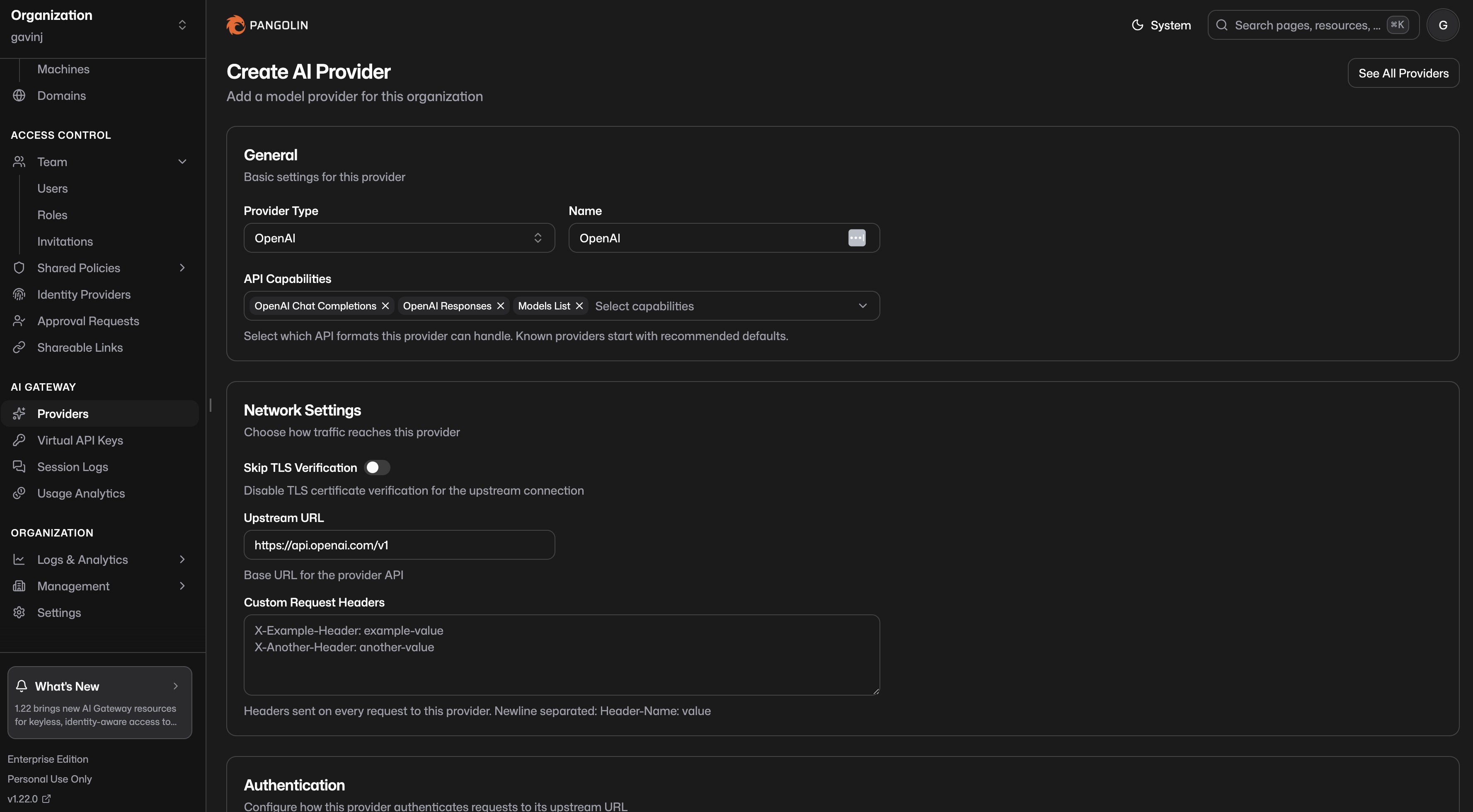
A provider is an organisation-level connection to an upstream model API: a type, credentials, a base URL, a set of capabilities declaring which API formats it can handle, and optional model allow and block lists. You create it once, then attach it to any AI Gateway resource in the org.
Custom is the type for anything not in the typed list: a self-hosted model server, a vendor API Pangolin doesn't know about, or a downstream router. You pick the capabilities yourself. It also gets one exclusive trick - Site Targets routing, which sends requests to the upstream over a Pangolin site tunnel. That's how you put an Ollama box on the home network behind the gateway without exposing it, and it's the bit that makes this unmistakably a Fossorial product rather than yet another AI proxy.
Registering Kimi K3
Moonshot's OpenAI-compatible endpoint lives at https://api.moonshot.ai/v1 and takes a bearer token. That maps straight onto a Custom provider:
- Sidebar, AI Gateway, Providers, Create.
- Provider Type: Custom. Give it a recognisable name - I used "Moonshot Kimi".
- Capabilities: select OpenAI Chat Completions. That's the format the endpoint speaks, and it's what clients like Codex and OpenCode expect.
- Routing Mode: Upstream URL, and paste the base URL:
https://api.moonshot.ai/v1
- Auth Type: Bearer, then paste the Moonshot API key. The key is stored on the provider and never leaves Pangolin.
- Allow list: add the exact model ids you intend to call - in my case
kimi-k3. The allow list is what the gateway advertises and accepts, so be exact. - Save, then attach the provider to an AI Gateway resource.
One small gotcha: the typed OpenAI provider's own default URL is https://api.openai.com/v1, so the /v1 suffix on Moonshot's address is the convention, not a typo. If you copy a base URL out of vendor docs and calls start 404ing, a missing or doubled /v1 is the first thing to check.
Registering DeepSeek
DeepSeek is the same exercise - OpenAI-compatible API, bearer auth:
- Providers, Create, Custom. Name: "DeepSeek".
- Capabilities: OpenAI Chat Completions.
- Routing: Upstream URL:
https://api.deepseek.com/v1
- Auth: Bearer, plus your DeepSeek key.
- Allow list: the model ids you plan to call -
deepseek-v4-proat the time of writing, but check the DeepSeek docs because their model naming has moved quickly this year. - Save and attach.
Ten minutes after discovering the buttons were missing, both vendors were on the gateway.
The Claude Code wrinkle: Kimi also speaks Anthropic
This is the part I found genuinely interesting. Moonshot also runs an Anthropic-compatible endpoint at https://api.moonshot.ai/anthropic, documented for driving Claude Code with Kimi. Pangolin's own docs use Kimi as their worked Custom provider example for exactly this reason.
So a second Custom provider gives you Kimi-as-Anthropic:
- Create another Custom provider - "Kimi Anthropic".
- Capabilities: Anthropic Messages and Anthropic Models.
- Routing: Upstream URL
https://api.moonshot.ai/anthropic. - Auth Type:
x-api-keywith the Moonshot key - the Anthropic convention, not Bearer. - Allow
kimi-k3, save, attach.
Why bother? Because the gateway accepts whichever formats its attached providers advertise, and Claude Code speaks Anthropic Messages. Point Claude Code at the gateway resource and it can be talking to Kimi K3 on the other side without knowing or caring:
{
  "apiKeyHelper": "echo 'pangolin-key-....'",
  "env": {
    "ANTHROPIC_BASE_URL": "https://ai-gateway.yourdomain.com"
  }
}
The Pangolin CLI will write that config for you - pangolin configure claude or pangolin configure codex - which beats hand-editing settings files.
Public or private?
Two flavours of gateway resource, and you can run both at once:
- Public: the resource gets a real FQDN. Clients call it from anywhere with a virtual API key - every org user already has an identity key, and you can mint manual keys for services and shared agents. Pangolin attributes every call to a user or a named key.
- Private: reachable only on devices connected with the Pangolin client. Nothing is published to the internet, and authentication is keyless - the connected client is the credential. For agents that refuse to start without something in the key field, the docs suggest the literal string
none.
For my setup the private resource is the interesting one. My machines already run the client, so there is no new secret to manage at all.
What the end user sees
That was the question I set out to answer, and the honest answer is: not much changes, which is rather the point. The agent gets a base URL and a key (or a tunnel session) and behaves exactly as it did before. The difference shows up in the dashboard - per-user and per-key spend, token volumes, and on Enterprise the full session transcripts of what the agents actually asked and got back.
If you've ever opened a vendor console to discover a coding agent ate a surprising amount of credit overnight, the budgets alone justify the exercise. A cap on the DeepSeek provider means the next runaway session gets a 429 instead of an invoice.
First impressions
It's an early iteration of the feature and it shows in places - the typed provider list will clearly grow, and I'd expect Moonshot and DeepSeek to arrive as one-click options eventually given where the coding-agent market is heading. But the Custom provider path is not a second-class workaround. It's the same machinery the first-party types use, with the knobs exposed. If a vendor speaks OpenAI Chat Completions - and in 2026, nearly everyone does - the missing button costs you about five minutes.
Next on the list: an Ollama box on the home network via Site Targets, so the gateway fronts local models and cloud credits through the same URL. I also want a week of Bob's traffic in the session logs, partly for the analytics and partly to see what I actually ask him. More once I've broken something.
Related:
- 🦎 Pangolin 1.22 release notes - the AI Gateway announcement
- 📖 Pangolin docs: Custom providers - capabilities, routing and auth reference
- 🔐 The Open Source Path from VPN Sprawl to Zero Trust Access - my original Pangolin evaluation
- 🤖 Bob Got an Update: Kimi K3 and the AI Sputnik Moment - why there's Moonshot credit in this house